SHI Environment Lockdown & Defense
Overview
SHIELD is a hybrid SaaS solution with a customer-installed app in their Azure tenant. The SHIELD app service is an orchestration tool that simplifies the deployment, management, and maintenance of Microsoft's Secure Privileged Access architecture. With SHIELD, you can automate the deployment of complex security infrastructures, device management, and user management while adhering to security best practices. SHIELD helps organizations to reduce the time and expertise required for deployment from a year or more to just a few minutes.
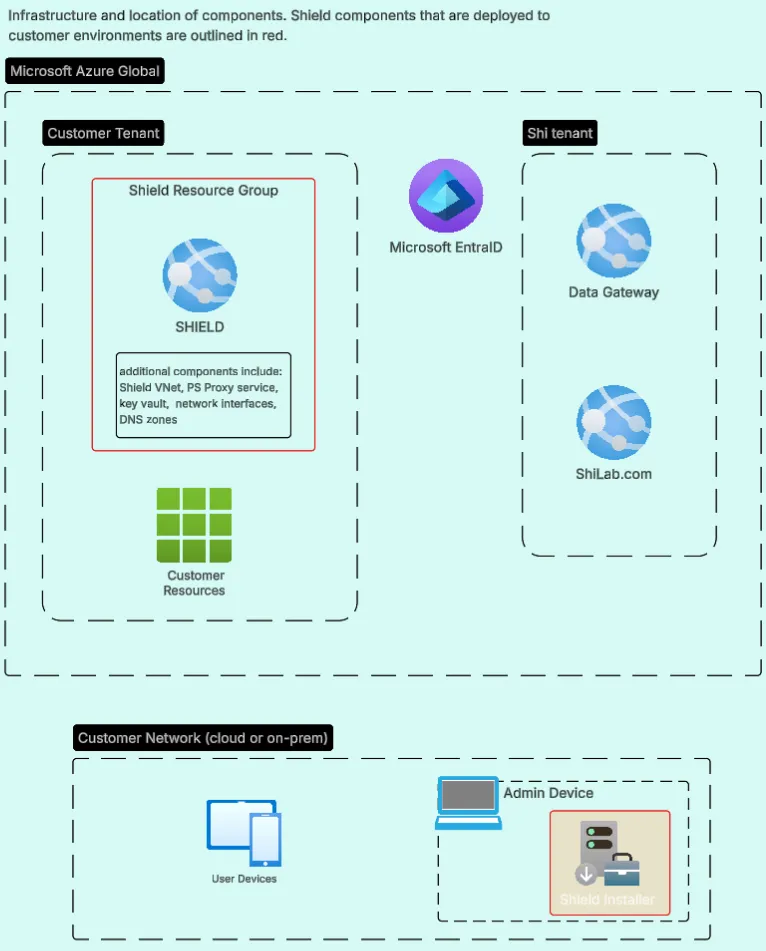
SHI operates a centralized SaaS service in its own Azure tenant known as the Data Gateway. This is a SaaS component shared by multiple customers using tenant isolation via access token claims cryptographically signed by Microsoft Entra ID. It provides storage, analysis, and reporting services for SHIELD data. The SHIELD app service collects and processes data within the customer tenant before providing abstracted & fully anonymized data results back to the Data Gateway for reporting and analysis.
ℹ️ Security Considerations
SHI does not manage or access the SHIELD app service runtime. Where authorized by the customer, the SHIELD app service may initiate configuration changes in the customer's tenant using delegated or application permissions explicitly consented to by the customer. All requirements can be set up by the delivery team or customer prior to engagement. Note that these configuration changes are deployed as security policies which will need further customer action to associate them with users.
Architecture Topology
The following diagram shows the high-level SHIELD deployment and trust boundaries between the customer tenant, SHI's SaaS tenant, and Microsoft Entra ID. SHIELD components that are deployed to customer environments are outlined in red.
Audience
This documentation is primarily intended for technical users who are responsible for the deployment, management, and maintenance of security infrastructures. However, the documentation is designed to be accessible to non-technical users as well.
Key Features and Benefits
SHIELD comes with a range of features that simplify the deployment and management of complex security infrastructures. Some of the key features and benefits of SHIELD are:
- Automate the deployment of complex security infrastructures
- Manage devices, users, intermediaries, and server/interfaces with ease
- Adhere to security best practices
- Reduce maintenance efforts
SHIELD in the Security Landscape
SHIELD is an orchestration tool in the larger security landscape. It does not bring new security functionality but instead automates the tools that already exist. SHIELD operates as an orchestrator for the rest of the security landscape, simplifying the deployment and management of complex security infrastructures.
Prerequisites
Check out this page for more details: Getting Started - Prerequisites
Installation
The SHIELD installer ('SHIELD - Desktop') is downloaded to the customer tenant and executed by an administrator. During installation, the administrator is required to authenticate interactively to the customers' Azure tenant. The installer uses this authenticated session to provision an Azure App Service and associated resources directly into the tenant under the customers' ownership and governance. No resources are deployed without explicit customer action and consent, and the resulting App Service operates entirely within the customers' Azure subscription. The installer provisions the SHIELD UI web application and associated components to the customer's tenant.
SHIELD Module Overview
Depending on licensing, the following components will be available from the UI:
The SHIELD Discover module enables advanced licensing intelligence and compliance reporting for Microsoft 365 services. It interrogates the Graph API, Defender API and Purview API to extract licensing information for the customer's tenant. It can then generate compliance reports for later analysis.
graph TD;
  	subgraph m365["Primary Inputs"]
		graphApi[Microsoft Graph API]
		defenderApi[Microsoft Defender API]
		purviewApi[Microsoft Purview API]
	end

	subgraph discover["SHIELD Discover Module"]
		collect[Data Collection Engine]
		normalize[Normalization and Correlation]
		analyze[Licensing Report Generation]
	end

	subgraph outputs["Discover Outputs"]
		licenseReport[Licensing Report]
		gateway[Data Gateway]
	end


	graphApi --> collect
	defenderApi --> collect
	purviewApi --> collect
	collect --> normalize
	normalize --> analyze
	analyze --> licenseReport
	licenseReport --> gateway
The SHIELD Defend module is responsible for all lifecycle operations within the SHIELD platform. It provides user and device onboarding, offboarding, access enforcement, and enforcement of privileged workflows in alignment with the SPA model deployed by the Deploy module.
Click this link to see more on Secure Privileged Access
graph TD;
    B[SHIELD Defend]
    B --> C[Security and readiness checks]

    C --> D[Device management]
    C --> E[User management]

    D --> H[Secure device onboarding and control]
    E --> I[Managed user lifecycle]

    D --> K[Microsoft security platforms]
    E --> K
The SHIELD Deploy module provides the foundation for a secure environment using Microsoft's Securing Privileged Access (SPA) architecture. This module automates the provisioning of security-critical components such as identity boundaries, privileged access zones, Conditional Access policies, and more.
graph TD;
    B[Deploy Module]

    B --> Seg["Environment Segmentation<br/>& Separation"]

    Seg --> Priv["Privileged Systems<br/>Restricted Access"]
    Seg --> Ent["Enterprise Systems<br/>Standard Access"]

    Priv --> D1["Provision Privileged Layer"]
    Ent --> D2["Provision Enterprise Layer"]

    D1 --> G["Entra ID & Roles<br/>Least Privilege"]
    D1 --> H["Intune Policies<br/>Hardened Controls"]
    D1 --> I["Azure Resources<br/>Isolated Infrastructure"]

    D2 --> G
    D2 --> H
    D2 --> I
Recommended Environment
While not mandatory, it is highly recommended to use SHIELD in the following environment:
- An Azure Subscription for hosting the application, as it is a security best practice to run the app in Azure
- All objects to be managed by SHIELD (devices, users, apps, etc.) synced/connected to Entra ID, the primary identity provider used by SHIELD
By following these recommendations, you can speed up the adoption process for SHIELD.
Summary
In the rest of the documentation, we will provide detailed instructions on how to install, configure, and use SHIELD to achieve these benefits.