Order Approvals
Feature Overview
Order Approvals provides a centralized workspace for reviewing and acting on orders that require approval. Instead of relying on email notifications or a separate approval page, approvers can review orders, view approval details, and approve or deny requests directly within SHI One. This feature is available to users who are designated approvers either directly or through an approval group.
Key Terms Explained
- Pending Approval: An order waiting for an approval decision.
- Approver: A user authorized to approve or deny an order.
- Approval Group: A group of users who can act on an approval request.
- Storefront: The organizational unit where an order was placed.
- Triggered By: The rule that caused the order to require approval.
- Approver Question: A question an approver must answer before making a decision.
- Checkout Question: Information entered by the requester during checkout.
- Product Quick View: A drawer that displays product and inventory details.
Hierarchy: View Orders > Pending Approvals > Review > Decide > Confirm
Functionality Overview
Access
Order Approvals can be accessed from:
- View Orders > Pending Approvals
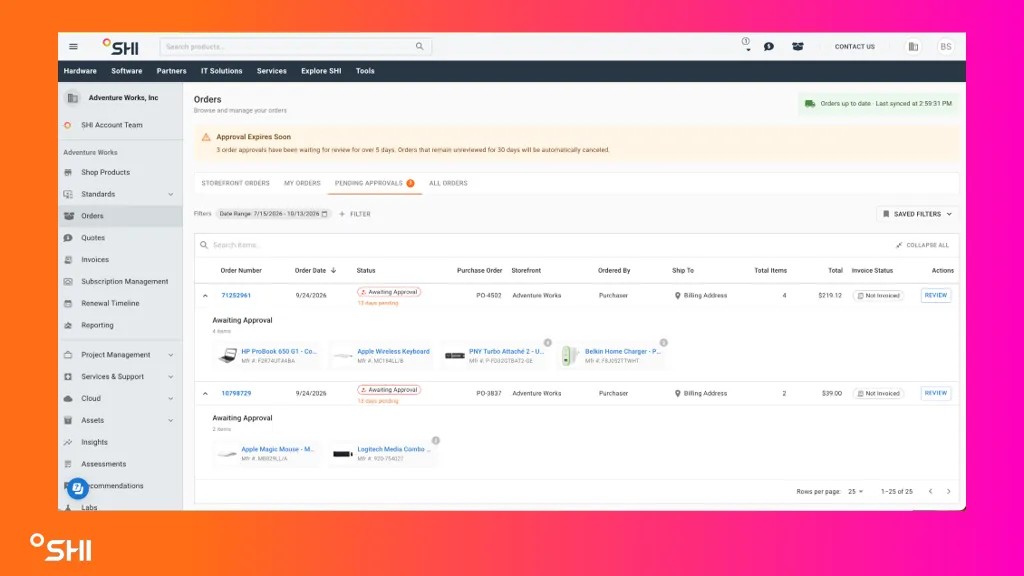
Pending Approvals Queue
Approvers can:
- View all orders awaiting their approval.
- See a pending approval count.
- Search by Web Order ID or requester name.
- View storefront, order age, and submission date.
- Expand orders to preview products.
- Launch the approval workflow using the Review button.
Approval Workflow
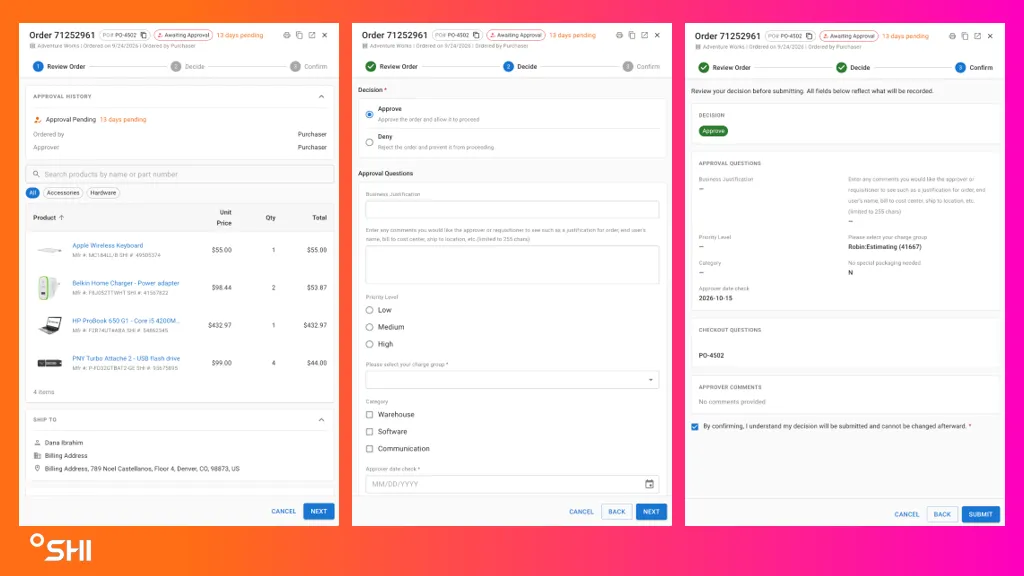
The approval process consists of three steps:
- Review: View order details, products, checkout answers, and approval information.
- Decide: Approve or deny the order, provide comments, and complete approver inputs.
- Confirm: Review the summary and submit the decision.
Product Quick View
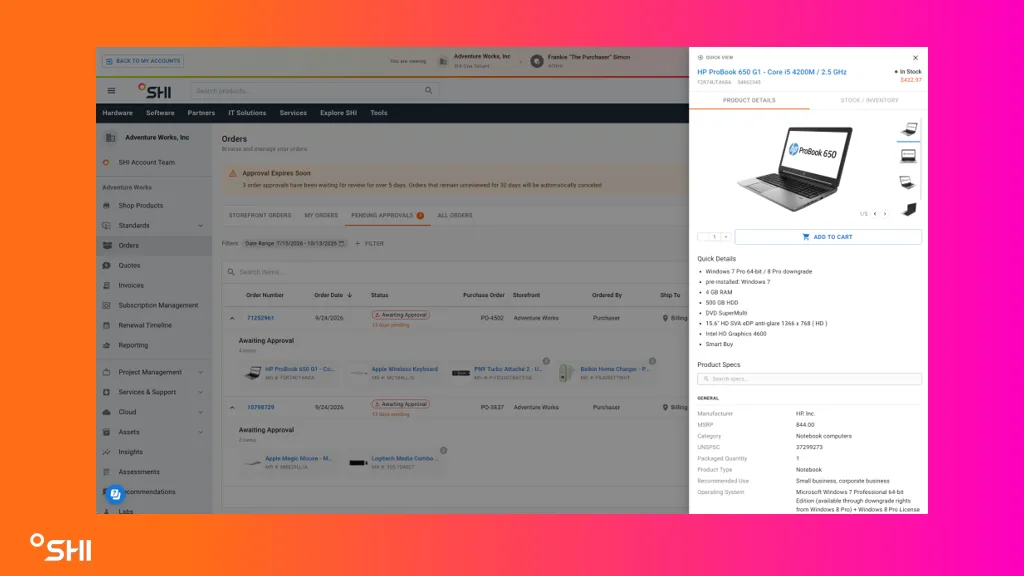
Selecting a product name opens a side panel that displays:
- Product details
- Inventory availability
- Additional product information
Notifications and Aging
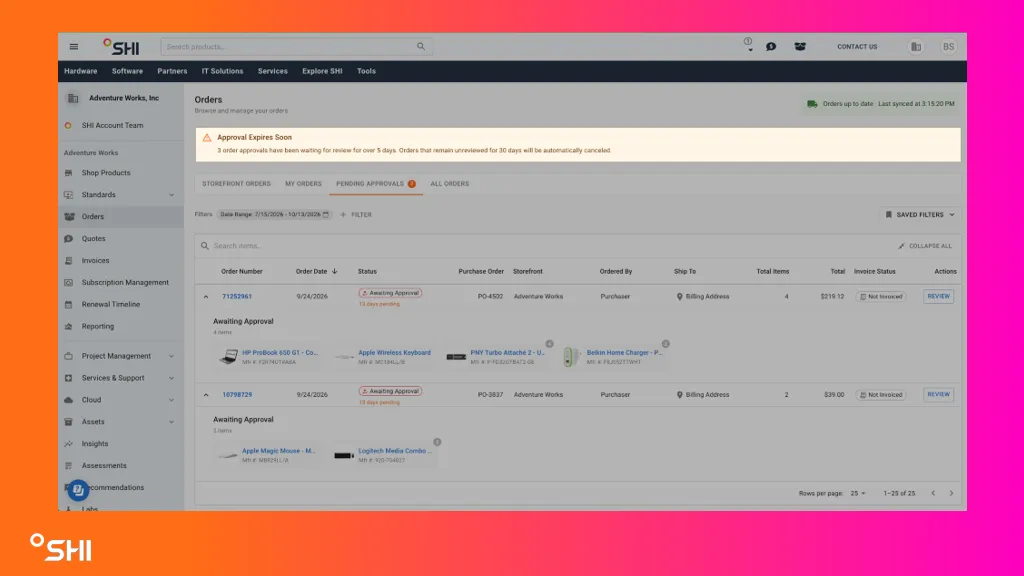
- Pending approvals display how long they have been awaiting review.
- A banner highlights approvals pending more than five business days.
- Orders not reviewed within 30 days are automatically canceled.
- Approved, denied, and expired approvals are removed from the queue.
Benefits
- Faster approval decisions.
- Better visibility into pending requests.
- Consolidated approvals across storefronts.
- Reduced reliance on email notifications.
- Product and order context available in one workflow.
Notes
- Approver questions may be required or optional.
- Checkout answers are currently read-only.
- Approval decisions cannot be changed after submission.
- Access is only available for customers using approval workflows.
FAQs
Why does an order require approval?
Review the Triggered By field to see which approval rule initiated the request.
Can I search for approvals?
Yes. Search by Web Order ID or requester name.
Can I notify other people?
Yes. Enter email addresses in Additional People to Notify. Separate multiple addresses with semicolons.
Can I change my decision after submission?
No. Approval decisions cannot be changed after submission.
What happens after 30 days?
Orders that remain unreviewed for 30 days are automatically canceled.
Why can't I see the Pending Approvals tab?
Your account may not have approval permissions, or approval workflows may not be enabled for your organization.