Reports
The Service Report page presents a dashboard of support request activity, including completion rates, SLA performance, request types, and submission trends. Its purpose is to give users a real-time, visual summary of how support services are being utilized and how well the support team is meeting service commitments.
Getting Here
The Service Report page is available to users with permission to view support analytics within the SHI One platform. Typically, this includes IT managers, support leads, and authorized analysts.
To access this page, use the left-side navigation, select Services & Support, then Service Report.
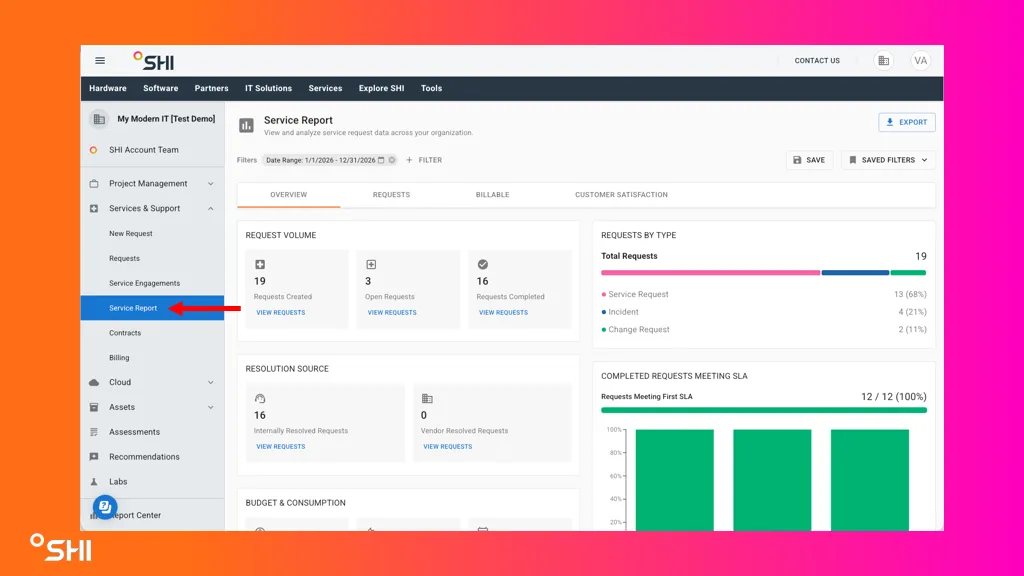
Once on the Service Report page, you can leverage visual widgets and filters to explore your support metrics in detail.
Reports
Report Page | Description / Purpose | |
|---|---|---|
Overview | View service performance, SLA compliance, request trends, and consumption metrics at a glance. | |
Requests | Analyze and investigate individual service requests using detailed filters and request data. | |
Billable | Review billable requests, hours, and charges associated with service activity. | |
Customer Satisfaction | Monitor CSAT scores, survey responses, and customer experience trends. | |
Exporting Report Data | Export filtered request data to Excel for reporting and analysis. | |