Contracts
The Contracts page provides a comprehensive list of all your organization’s active SHI service contracts. For each contract, users can see the contract name, billing type, contract type, duration, utilization, linked projects, and expiration date. The page includes search, filter, and navigation features to help users quickly find and review contract details.
Getting Here
This page is viewable by all SHI One users who have permission to access the Services module. Access to specific contract details may be restricted based on your organization’s user roles or SHI One administrative settings.
To access the Contracts page click on Services in the left-hand navigation menu. From the expanded Services section, select Contracts.
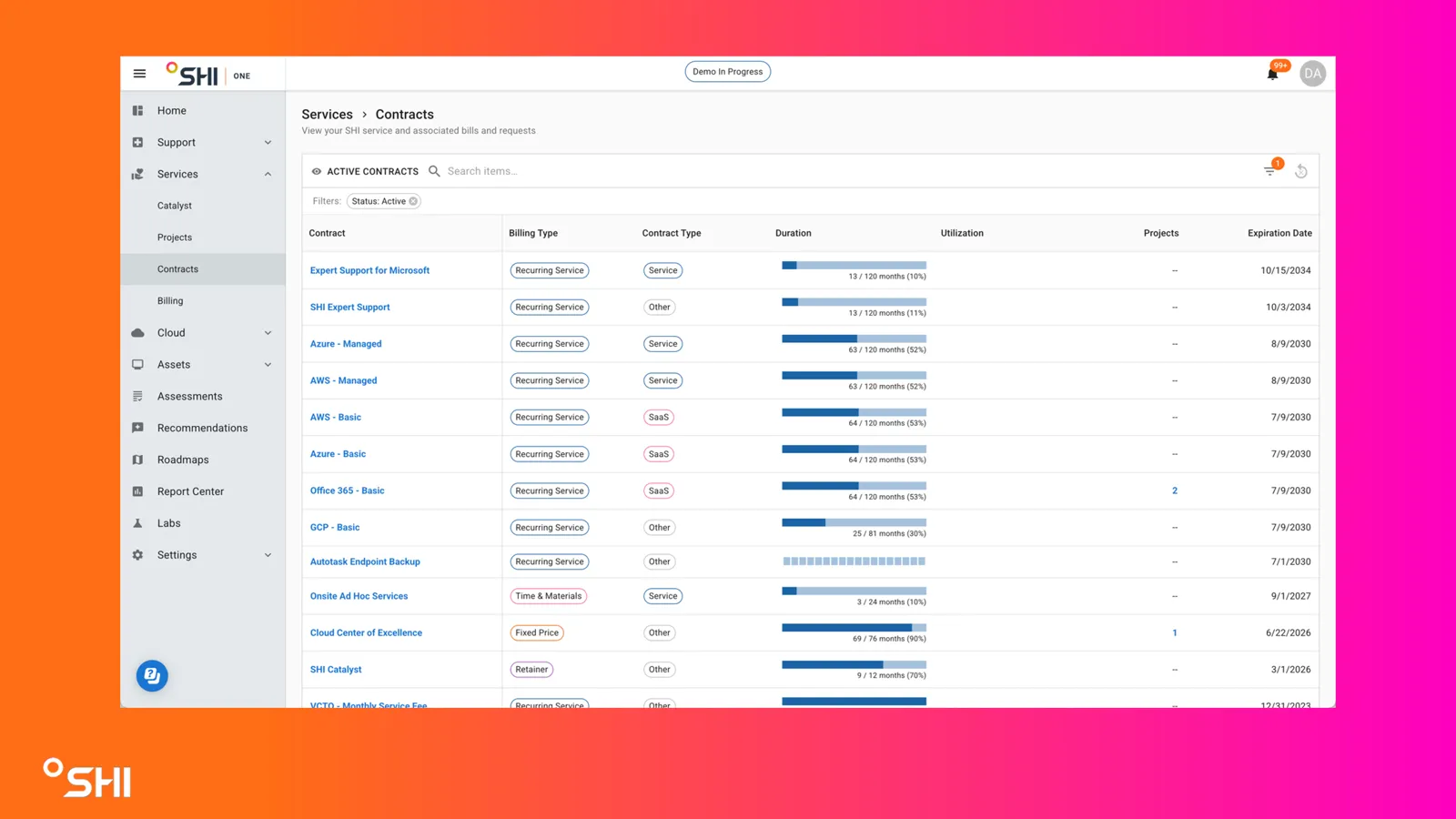
Once on the Contracts page, you can review all active contracts and use search or filters to refine your view. The following sections provide a detailed breakdown of the page’s features and how to use them.
How To Guides
How to View Contract Details
- In the contracts table, locate the contract of interest.
- Click on the contract name (displayed as a blue hyperlink).
- You will be taken to a detailed contract view with further information and potential actions.
How to Track Contract Utilization
- Review the Utilization column in the contracts table.
- Hover over the utilization bar for more detailed percentage or usage information (if available).