Address Management
17 min
Feature Overview
- Address Management gives you one place to manage shipping addresses you use on SHI One and SHI.com.
- There are two distinct types of addresses:
- Personal Addresses: Your own shipping addresses. Available to every user, manageable only by you, and automatically available in any storefront you access.
- Organizational Addresses: Shared shipping addresses tied to a specific storefront. Available to users with the right permissions and shared with everyone who shops in that storefront.
- Why it matters:
- Faster, more accurate checkout through address autocomplete and a map preview.
- A clean separation between addresses you own and addresses your organization shares.
- Group based organization and a default address for organizational addresses, which flow into SHI.com checkout automatically.
- Who it is for:
- All users: Personal Addresses.
- Storefront Managers, Procurement Admins, Global Admins, and SHI One Admin users: Organizational Addresses for their storefront.
Key Terms Explained
- Personal Address: A shipping address you own. Only you can view or edit it. It is available across every storefront you access.
- Organizational Address: A shipping address that belongs to a storefront and is shared with that storefront's users.
- Address Group: A label (tag) applied to one or more Organizational Addresses, for example "HQ" or "West Coast". Groups display as chips. Groups apply only to Organizational Addresses.
- Default Address: The single Organizational Address marked as default for a storefront. It is shown with a star icon and is the address SHI.com checkout pre selects. Defaults apply only to Organizational Addresses.
- Site Name: An optional label you give an address. When present, it is used as the address's display Name in the list.
- Address Drawer: The right side panel where you create or edit an address. Create and Edit use the same layout; Create opens with empty fields.
- Hierarchy: Storefront > Organizational Addresses > Address Group(s) > Address. Personal Addresses sit outside this hierarchy and persist across storefronts.
Functionality Overview
- Personal Addresses (all users):
- View, search, create, edit, and remove your personal shipping addresses.
- Use them in any storefront automatically.
- No groups and no default address flag.
- Organizational Addresses (permissioned users):
- View every shared address for the storefront in a single list.
- Filter by Address Group (multi select) and by Location (Country, State, City).
- Search within the currently filtered list.
- Create new addresses with a map preview and address autocomplete (Pigeon Maps with OpenStreetMap).
- Assign one or more groups to an address, or create new groups on the fly.
- Set one default address per storefront. SHI.com checkout respects the default and pre selects its first group.
- Edit any address from its row.
- Notes and constraints:
- The SHI.com account settings page no longer hosts these tools. Address management lives in SHI One.
- Bulk address upload and export are planned for a future release.
Getting Started
Accessing Personal Addresses (My Addresses)
- From any SHI One or SHI.com page, open the user profile dropdown in the top right header.
- Select My Addresses.
- The My Addresses page opens. This page is independent of the storefront you are in, so the same list is available wherever you shop.
Accessing Organizational Addresses
- Organizational Addresses live inside the storefront you want to manage. There are two ways to get there from SHI One:
- From the storefront profile dropdown in the header, under your organization name, select Manage Addresses. This takes you directly to your Organizational Addresses.
- From the SHI One left navigation, open Settings > Storefronts, choose your storefront, and select the Addresses tab.
Prerequisites and Permissions
- Personal Addresses: Available to every signed in user. No special permission required.
- Organizational Addresses (view and edit): You need one of the following roles:
- Storefront role: Manager
- Procurement Admin
- Global Admin
- SHI One Admin user (for users coming from SHI.com with access to edit storefront addresses)
- If you do not see Manage Addresses in your storefront dropdown or the Addresses tab in your storefront, you do not have the required permission. Contact your storefront administrator.
Using My Addresses (Personal)
1. Viewing Your Personal Addresses
- Open My Addresses from the user profile dropdown.
- Review the list columns: Name, Street Address, City, State, and additional location columns.
- Use the Search addresses box at the top to find a specific address by name or street.
- Note: Personal Addresses do not display groups, chips, or a default star. Each address simply appears in the list.
2. Adding a Personal Address
- From My Addresses, select + New Address (top right).
- The New Address drawer opens with a map preview at the top.
- In Address Lookup, start typing your address. Suggestions appear from the map provider. Press Tab to accept a suggestion, which fills Street Address, City, State, and ZIP automatically.
- Review and adjust the fields. You can always override the autocomplete result:
- Street Address (required)
- Street Address 2 (optional)
- City (required)
- State (required)
- ZIP (required)
- Site Name (optional): A friendly label, for example "Home" or "Apartment".
- Select Create Address to save, or Cancel to discard.
- Result: The drawer closes and the new address appears in your personal list. It is now available at checkout in every storefront you access.
3. Editing or Removing a Personal Address
- In My Addresses, locate the address you want to update.
- Select the edit icon on the row.
- Adjust any fields in the drawer, then select Save.
- Result: Your changes are reflected immediately.
Using Organizational Addresses (Storefront)
1. Viewing the Organizational Address List
- Open the Addresses tab inside your storefront.
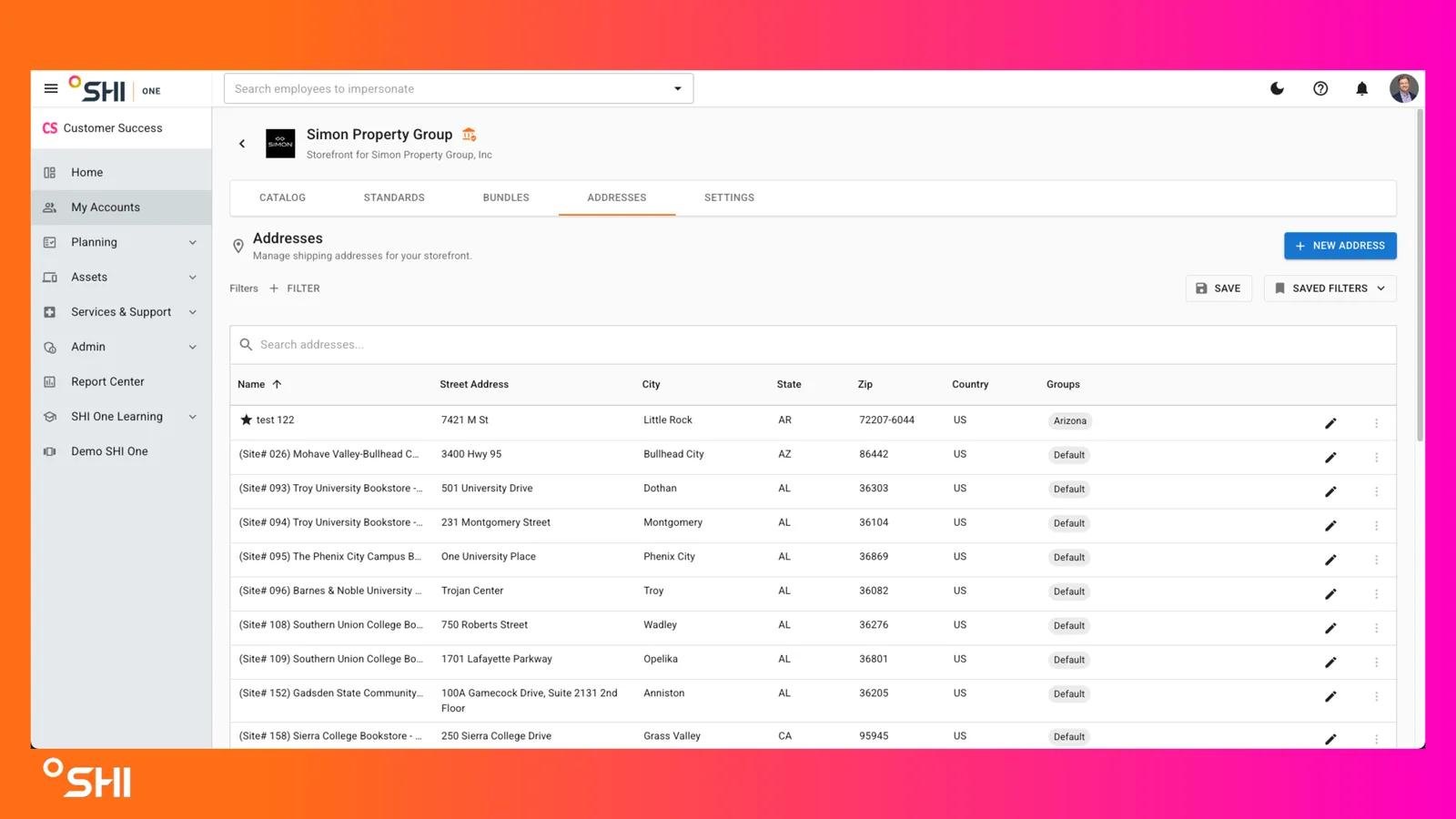
- Review the columns: Name, Street Address, City, State, Zip, Country, Groups, and the row level edit action.
- The Name column shows, in priority order: Site Name, then Street Address.
- A star next to the Name marks the storefront's default address.
- The Groups column shows each group the address belongs to as a chip. An address can belong to multiple groups.
2. Searching and Filtering
- Use the Search addresses box to search within the current list by name or address text.
- Select + Filter above the table to open the filter panel.
- Choose a filter category:
- Address Group: Check one or more groups.
- Location: Drill down Country > State > City and check the values you want.
- Select Apply to apply, or Cancel to discard.
- Optionally select Save to store the current filter combination, or open Saved Filters to reuse a stored set.
- Result: The list updates to show only matching addresses. The search box scopes to that filtered subset.
3. Creating an Organizational Address
- From the Addresses tab, select + New Address in the top right.
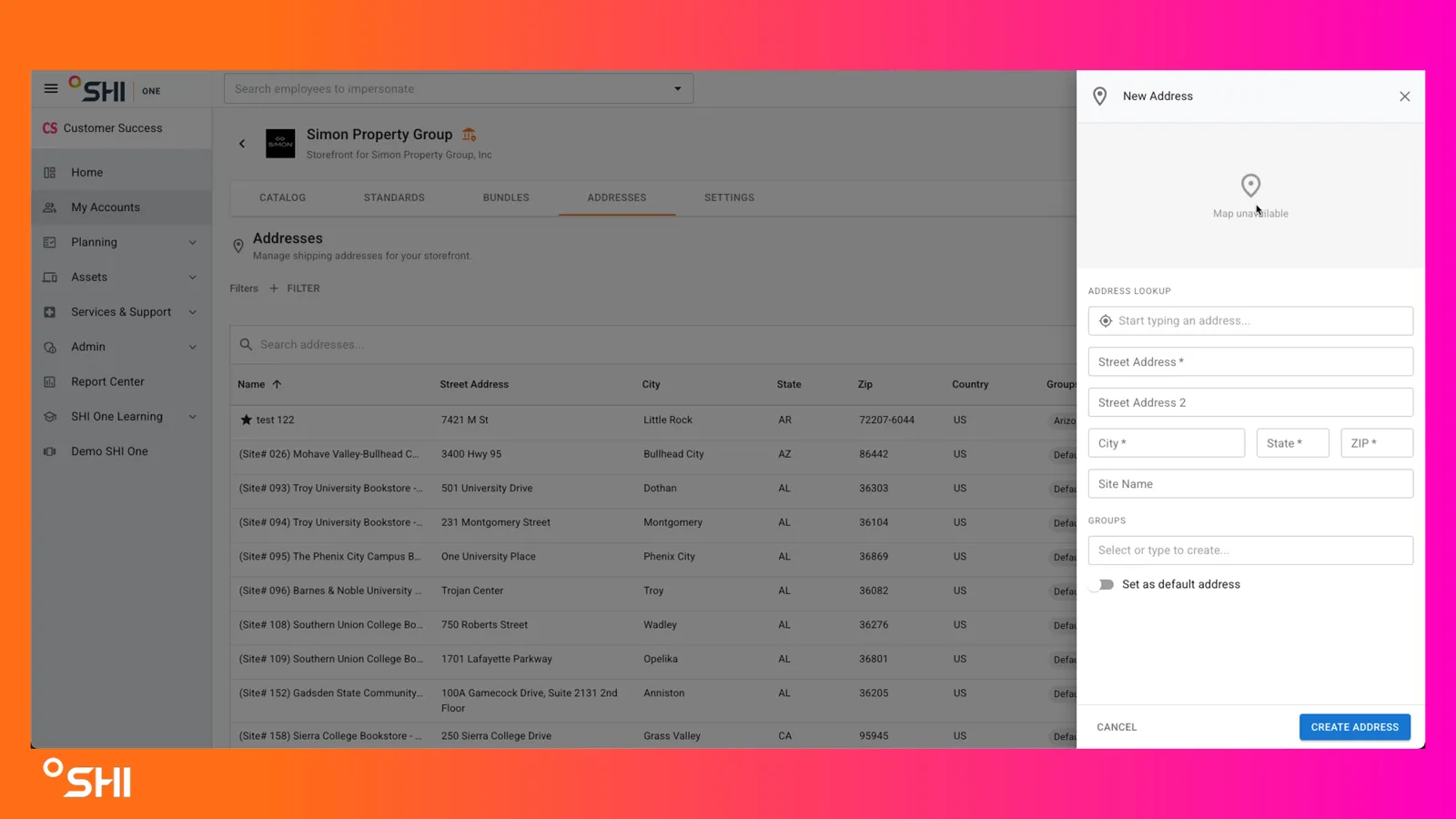
- The New Address drawer opens with a map preview at the top.
- In Address Lookup, start typing the address. Press Tab to accept a suggestion and auto fill Street Address, City, State, and ZIP. You can override any field.
- Complete the remaining fields:
- Street Address 2 (optional)
- Site Name (optional, recommended): Used as the primary display Name in the list.
- In Groups, select one or more existing groups from the dropdown, or type a new name to create a group on the fly. Each selection appears as a chip and can be removed with its close icon.
- Toggle Set as default address on if this should be the storefront's default. Only one address can be default at a time.
- Select Create Address to save, or Cancel to discard.
- Result: The drawer closes and the new address appears in the list, with its groups and default star if applicable.
4. Editing an Organizational Address
- In the list, locate the address you want to update.
- Select the edit (pencil) icon at the right side of the row.
- The drawer opens pre populated. Adjust fields as needed:
- Street and location details
- Site Name, Street Address 2
- Group memberships (add or remove chips, or create a new group inline)
- Default address toggle
- Select Save to apply, or Cancel to discard.
- Result: The list reflects your updates, including any change to the displayed Name, Groups chips, or default star.
5. Setting the Default Address
- Open the address you want to make default by selecting its edit icon.
- Turn Set as default address on.
- Save the drawer.
- Result:
- The new default shows a star next to its Name.
- The previous default loses its star.
- SHI.com checkout will pre select this address, and the first group on the default will be the initial group shown in checkout.
6. Managing Address Groups
- Groups are managed directly from each address, not on a separate page.
- Add an existing group:
- Open the address.
- In Groups, choose one or more existing chips from the dropdown.
- Save.
- Create a new group:
- Open the address.
- Type the new group name in Groups and confirm it as a chip.
- Save.
- Remove a group: Select the x on the chip in the Groups field and save.
- Notes:
- One address can belong to multiple groups.
- New groups are available in the first step of SHI.com checkout right after you create them.
Use Cases and Scenarios
- Primary use cases:
- A traveling employee adds a hotel address as a Personal Address so a one time shipment can be sent there from any storefront.
- A storefront Manager onboards new campus sites as Organizational Addresses and groups them by region for faster checkout.
- A Procurement Admin changes the default address after a corporate headquarters move so checkout always starts with the right ship to.
- A Global Admin filters Organizational Addresses by state to confirm coverage before a bulk order rollout.
- Best practices:
- Fill in Site Name when you create an address. Without it, the list falls back to Ship To, then to the street address.
- Keep group names short and consistent (for example by region or business unit).
- Use autocomplete whenever possible to reduce typos and ZIP errors. Override only when the suggestion is wrong.
- Keep your Personal Addresses tidy.
- Confirm the default flag before validating SHI.com checkout behavior.
Troubleshooting and FAQs
Common issues
- "I do not see Manage Addresses or the Addresses tab.": You probably do not have the required role for Organizational Addresses. Personal Addresses are still available from your profile dropdown under My Addresses.
- "Autocomplete is not finding my address.": You can manually complete the fields and still save the address. The provider is Pigeon Maps with OpenStreetMap.
- "My default address is not showing in SHI.com checkout.": Confirm exactly one address shows the star. If checkout was open before the change, refresh the session.
- "I cannot find a group I created.": Groups appear after at least one address is saved with that group. Reopen the address to confirm the chip persisted.
- "The Name column shows the street address instead of a label.": The address has no Site Name or Ship To. Edit the address and add a Site Name.
- "Where did the address option in SHI.com account settings go?": SHI.com account settings now hides or redirects this functionality back to SHI One.
FAQs
- Can a Personal Address belong to a group?
- No. Groups apply only to Organizational Addresses.
- Can I set a default Personal Address?
- No. Defaults apply only to Organizational Addresses.
- Will my Personal Addresses work in every storefront I access?
- Yes. They persist across storefronts automatically.
- Can one Organizational Address belong to multiple groups?
- Yes. Groups behave as tags and appear as chips.
- Can I bulk upload or export addresses?
- Not in this release. Bulk upload and export are planned for a future release.