New Quote Creation
Feature Overview
The Quote Creation Flow in SHI One enables users to quickly create customer quotes through a guided three-step process. The workflow simplifies product selection, shipping and tax configuration, and quote finalization while ensuring accurate pricing and visibility across quote management pages. This feature is designed for sales representatives, account managers, and other users responsible for generating customer quotes. Key outcomes include:
- Create quotes through a guided workflow.
- Adjust product quantities before generating a quote.
- Include or exclude shipping costs.
- Estimate tax based on the selected shipping address.
- Send quote notification emails during quote creation.
- View completed quotes from the Quotes section immediately after creation.
Functionality Overview
Users can:
- Create a new quote using a guided three-step workflow.
- Select products and adjust quantities before generating a quote.
- Configure shipping options and estimate taxes using a shipping address.
- Finalize the quote and send optional email notifications.
Additional capabilities:
- Include or exclude shipping costs from the quote.
- Add a new shipping address or select an existing address.
- Automatically estimate taxes based on the selected shipping destination.
- Provide a quote name and description for easier identification.
- Email quote copies to yourself or other recipients during quote creation.
- Access created quotes through both the View Quotes page and Quote Details page.
Notes or constraints:
- Tax amounts are estimates and depend on the selected shipping address.
- Users must provide a shipping destination to receive tax estimates.
- Email notifications are only sent to recipients selected during quote creation.
Getting Started
Prerequisites
- Accounts/roles required: Authorized SHI One user with quote creation permissions.
- Configuration required: None.
- Data required:
- Products available for quoting.
- Customer shipping information if shipping and tax calculations are required.
Using Quote Creation Flow (Step-by-Step Guides)
Creating a New Quote
Step 1: Select Products and add to cart.
- Click Save as Quote.
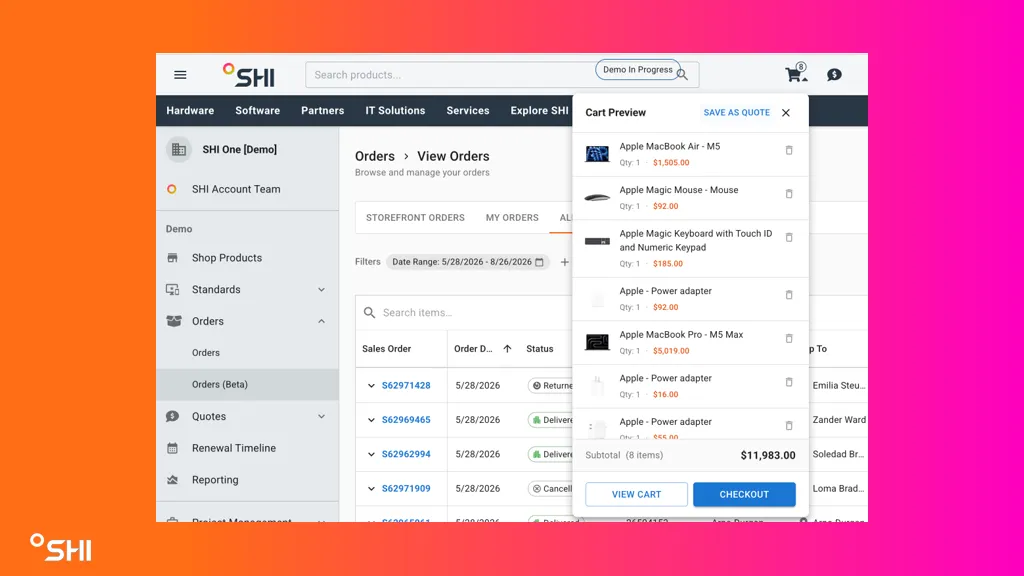
- Adjust product quantities as needed.
Step 2: Configure Shipping and Tax
- Choose whether shipping costs should be included in the quote.
- Select an existing shipping address or add a new address.
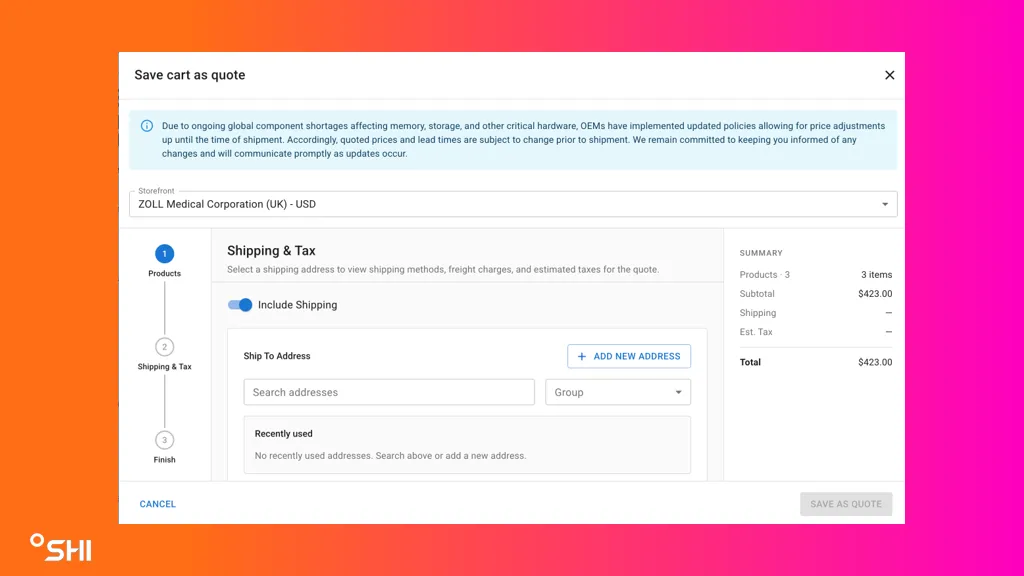
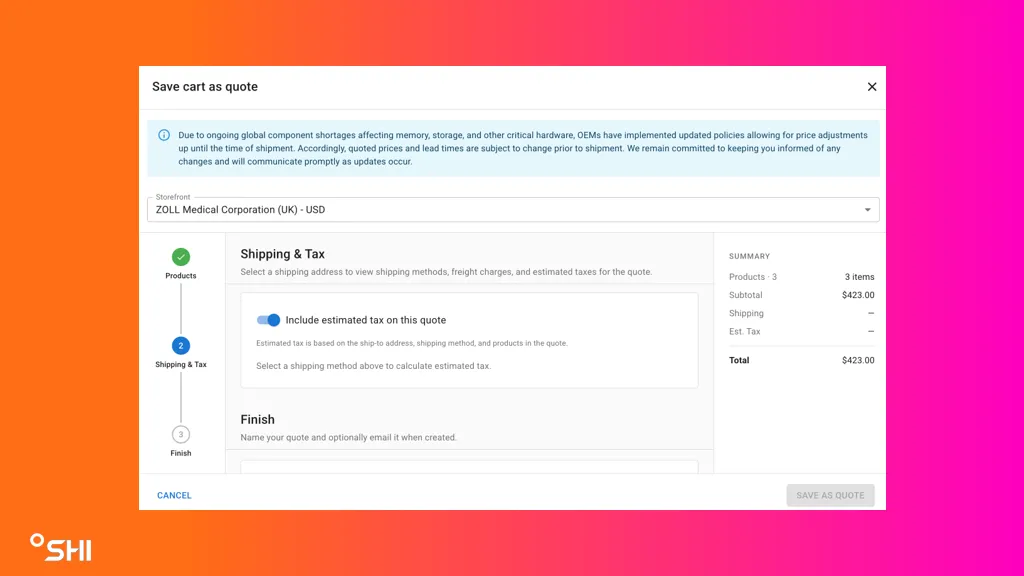
- Review the estimated shipping and tax amounts generated for the selected address.
- Choose whether estimated taxes should be included in the quote.
Step 3: Finalize the Quote
- Enter a quote name.
- Optionally provide a quote description.
- Choose whether to email a copy of the quote to yourself.
- Add additional email recipients if desired.
- Click Save as Quote.
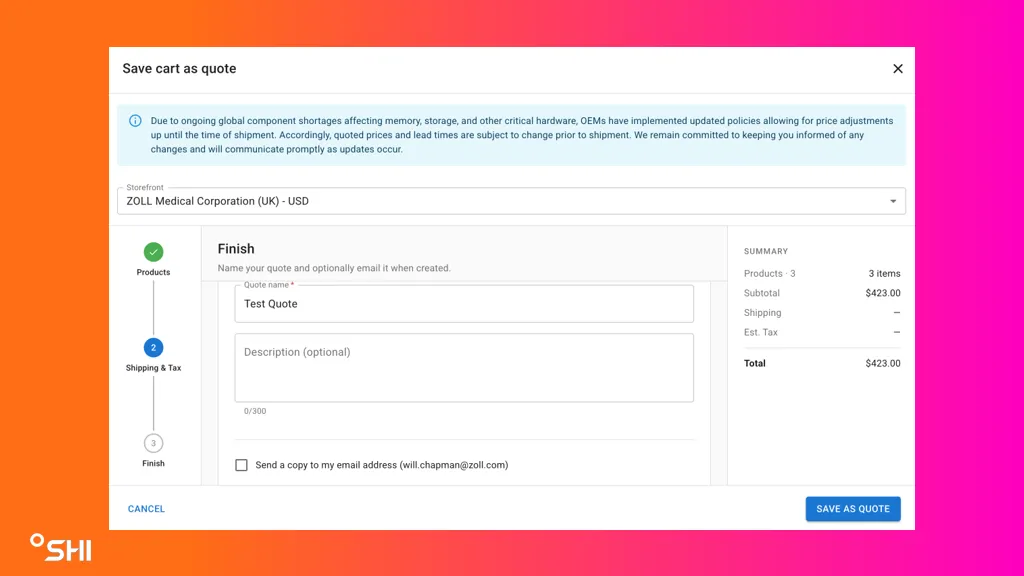
- Result: The quote is created and stored in SHI One.
Use Cases & Scenarios
Primary Use Cases
- Generate a customer quote with accurate product pricing.
- Create a quote that includes shipping costs.
- Generate a quote with estimated taxes for a specific delivery location.
- Send quote copies to internal stakeholders for review.
- Create and immediately access quotes from the View Quotes page.
Best Practices
- Review quantities carefully before proceeding to shipping and tax configuration.
- Use the correct shipping address to ensure accurate tax estimates.
- Provide meaningful quote names to simplify future searches.
- Send yourself a copy of the quote for recordkeeping and validation.
- Verify totals before finalizing the quote.
Troubleshooting and FAQs
Common Issues
Tax estimate is not displayed
- Verify that a valid shipping address has been selected.
- Confirm that all required address information is complete.
Shipping costs appear to be incorrect
- Review the selected shipping address.
- Confirm whether shipping was configured to be included or excluded.
Quote cannot be found after creation
- Check the View Quotes page.
- Refresh the page and search for the quote name.
- Verify that quote creation completed successfully.
Email notification was not received
- Confirm that the recipient email address was entered correctly.
- Check spam or junk mail folders.
- Verify that email notification options were selected before creating the quote.
FAQs
Can I create a quote without shipping costs? Yes. The quote creation flow allows shipping to be included or excluded.
Can I add a new shipping address during quote creation? Yes. Users can choose an existing address or add a new one during the shipping configuration step.
How is tax calculated? Tax is estimated based on the selected shipping address.
Where can I find a quote after it is created? Quotes are available from both the View Quotes page and the Quote Details page.
Can I email a copy of the quote to other users? Yes. Additional recipients can be added during the quote finalization step.
Glossary of Terms
- Quote — A pricing document containing selected products, quantities, shipping details, taxes, and totals.
- Product Selection — The process of choosing products and defining quantities for a quote.
- Shipping Address — The destination address used to calculate shipping costs and tax estimates.
- Tax Estimate — An estimated tax amount calculated based on the selected shipping address.
- Quote Details Page — The page displaying all information related to a specific quote.
- View Quotes Page — The page that lists all created quotes available to the user.
Hierarchy or relationships: Product Selection > Shipping & Tax Configuration > Quote Finalization > Quote Visibility
Related Resources
- View Quotes PageView Quotes
- Quote Details PageQuotes Details